Controls and shortcuts
TacticFront plays with a mouse and keyboard or with touch alone. Every key below is the default; Settings → Shortcuts rebinds them (type a key and it is saved; a key the same menu already uses trades places with it).
The four command menus
The command deck has four buttons. Each opens a menu whose choices have their own letter, so every action is two or three keys away.
| Key | Menu |
|---|---|
| Q | Diplomacy |
| W | War |
| E | Build |
| R | Research |
| Esc or right-click | Back or cancel |
Diplomacy (Q)
| Then | Action |
|---|---|
| Q | Alliance: click a player to offer one |
| W | Peace / non-aggression pact |
| E | Aid |
| R | Signals |
| D | All nations (the list of every player) |
War (W)
| Then | Action |
|---|---|
| W | Strike plan (so W, W opens the planner) |
| Q | Units: Q select units, W missiles, E airstrikes, R mass strike |
| D | Navy: Q naval landing, W naval rallies, E shipyard |
| S | Frontlines: Q Hold, W Normal, E Auto strikes, R Aggressive |
Under Units → Missiles: Q ICBM, W Nuclear barrage, E submarine, R destroyer, T rocket salvo, A arsenal ship (Communist). Under Units → Airstrikes: Q airfield, W carrier, E gunships.
Build (E)
| Then | Menu | Choices |
|---|---|---|
| Q | Military | Q defense post, W barracks, E air defense, R ICBM, T airfield, A port, S rocket battery, D shore battery, F radar station, G air-assault base |
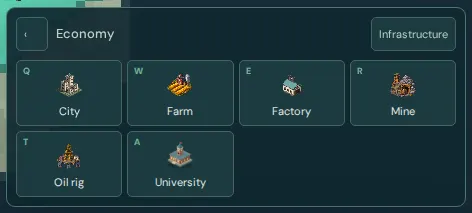
| W | Economic | Q city, W farm, E factory, R mine, T oil rig, A university |
| E | Special | Q port, W hospital, E upgrade city, R Coalition HQ, A rebuild capital, S People's Army base (Communist), D launch complex (Capitalist) |
| R | Shipyard | Q destroyer, W arsenal ship (Communist), E carrier, R submarine, S landing ship, A choose port |
| D | Last building |
Research (R)
Opens the research dialog: choose an ideology, switch tabs, and queue topics.
Direct keys
| Key | Action |
|---|---|
| Z | Expand into wilderness in every direction |
| C | City build mode: rings show which cities you can upgrade now |
| V | Defense post |
| L | The last building you placed |
| X | The actions menu at the cursor |
| B | Infrastructure |
| G | Mass strike on the selected enemy |
| P | Pause (solo practice and replays) |
| Space (hold) | Terrain, ore and oil |
| F3 | Performance statistics |
| ? | The field manual |
Every building can also have its own key: Settings → Shortcuts lists them, most unset.
Mouse
| To | Do |
|---|---|
| Inspect a player or building | Hover or click |
| Expand toward wilderness | Click it |
| Declare war and attack | Double-click a neighbour's land |
| Move an attack's focus and reinforce | Double-click enemy land you are fighting |
| Actions menu | Right-click |
| Move the camera | Drag, or the arrow keys |
| Zoom | Scroll |
| Select ships and weapon buildings | Right-drag a box (Shift adds or removes) |
| Select every one of a type on screen | Double-click one (again, or Ctrl+double-click, for the whole map) |
Fleets and weapon buildings
With ships selected:
| Key or click | Order |
|---|---|
| Right-click water | Move (Shift queues waypoints) |
| M, then click water | Move |
| A, then click water, or Ctrl+right-click | Attack-move |
| Right-click an enemy ship | Attack it |
| Right-click enemy land | Bombard (Ctrl: missiles, Alt: shells) |
| H | Hold: fire from here, never chase |
| J, or right-click your port | Return to port to restock and repair |
| Y, then click water or a flag | Rally |
| Ctrl+1 to Ctrl+9 | Make the selection fleet or group N |
| 1 to 9 | Select fleet or group N (twice centres the camera) |
Silos, rocket batteries, forts with artillery, airfields and air-assault bases share the box selection: right-click enemy land for a conventional strike from all of them. Silos never fire from there; use Launch at target on their card. See the navy guide and strike plans.
Touch
| To | Do |
|---|---|
| Inspect | Tap (an inspect card opens) |
| Expand | Tap wilderness |
| Declare war | Long-press a neighbour, then Declare war |
| Reinforce or move an attack's focus | Long-press enemy land, then Reinforce |
| Actions menu | Long-press |
| Command menus | The four buttons on the command deck (a rail on the right in landscape) |
| Cancel | Cancel on the mode banner |
| Terrain and resources | The ▧ button |
| Move and zoom the camera | Drag and pinch |
| Select ships and weapons | Select in the fleet strip, then drag; or tap one |
| Order ships | Tap water to move, an enemy ship to attack, enemy land to bombard |
| Naval landing | Tap land near a reachable coast, then Land |
| Pause solo | The pause button |
Settings has music, effects quality, reduce flashes, camera shake, battery saver and tips. The battery saver keeps phones cool in long matches.